Every professional cloud architect knows the standard drill for securing a web application: you spin up an external HTTPS Load Balancer, enable Google Cloud Armor, and click "On" for the pre-configured WAF rules. It takes five minutes, and it works. It also adds at least $20-25 per month to your bill before a single real user even hits your site.
At K-Ops, we prefer a more lean, engineering-driven approach. By leveraging the multi-container sidecar pattern in Google Cloud Run, we can run a full-blown OWASP ModSecurity WAF directly inside our service—protecting our app from SQLi, XSS, and LFI without the Load Balancer tax.
Note: While we use Google Cloud Platform (GCP) as our primary example here, these architectural patterns are platform-agnostic. Whether you are running on AWS ECS, Azure Container Apps, or your own Kubernetes clusters, the principle of moving the WAF into the sidecar remains a universal win for cost and performance.
The Architecture: The Sidecar Proxy
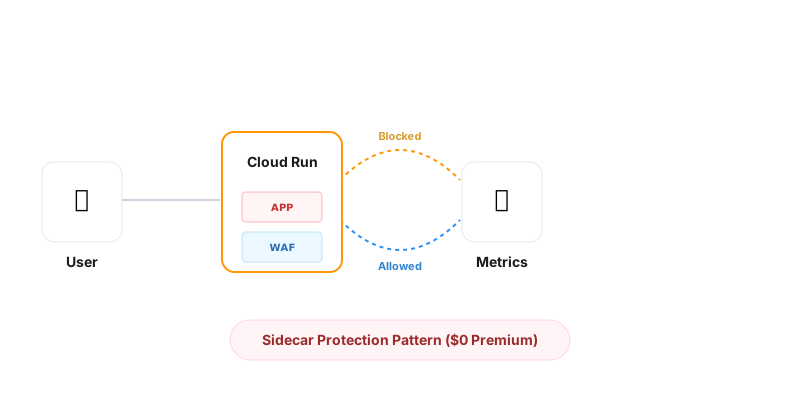
Instead of relying on a centralized cloud service, we bake the protection directly into our deployment. Our Cloud Run service consists of two containers working in tandem:
- The Shield (Sidecar): A lightweight Nginx container running the
owasp/modsecurity-crsimage. It listens on port 8080 (the ingress port) and handles all incoming requests. - The App (Primary): Your Flutter/Java/Go application listening on a private port (e.g., 9090). It only receives traffic that has been sanitized by the sidecar.
This "Strategic Frugality" pattern means that if a request is malicious, it never even reaches your application logic. The sidecar kills the connection at the edge of your container.
1. The WAF Image (Dockerfile)
At K-Ops, we utilize a Sidecar Pattern: running an OWASP ModSecurity container directly alongside your application in the same Cloud Run service. This allows for enterprise-grade WAF protection with zero additional infrastructure costs and microscopic latency.
Our build process looks like this:
FROM mirror.gcr.io/owasp/modsecurity-crs:nginx

# Include custom overrides (e.g., disabling rules for specific paths)
COPY modsecurity-override.conf /etc/nginx/templates/modsecurity.d/modsecurity-override.conf.template
2. Terraform Integration
Deploying this requires the multi-container support in Cloud Run (available in the beta provider or current GA). We define the ModSecurity container as our ingress and point it to localhost:9090:
containers {
    image = var.docker_image_ms # Our OWASP Shield
    ports {
        container_port = 8080
    }
    env {
        name  = "BACKEND"
        value = "http://localhost:9090"
    }
}

containers {
    image = var.docker_image # Our App
}
The "$20 Savings" Breakdown
Why go through the effort of building this? Because cloud providers charge for convenience. Here is the math for a single small service:
- Cloud Armor Standard: ~$5/month base + rules fees.
- External HTTPS Load Balancer: ~$18-20/month base cost for the forwarding rule.
- K-Ops Sidecar Approach: $0.00. The WAF runs within the existing Cloud Run CPU/RAM allocation.
For a startup running 5–10 microservices, this is the difference between a $200 monthly "cloud tax" and zero waste.
Observability: Monitoring Violations
A WAF is useless if you don't know what it's blocking. Because Cloud Run captures stdout and stderr from all containers, ModSecurity's "Access Denied" logs are automatically streamed to Google Cloud Logging.
By creating a Log-based Metric that filters for these violations, we can build a dashboard in Cloud Monitoring that shows:
- Total Blocked Requests (Security Posture).
- Violation Types (SQLi vs No-IP vs Scanner).
- Top Attacker IPs.
Conclusion
Security shouldn't be a premium add-on. By moving the WAF into the application container flow, we gain more control, better visibility, and a significantly lower cloud bill. This is how we build stable, professional-grade infrastructure without the enterprise bloat.
If you need help architecting high-performance, cost-effective security for your GCP workloads, K-Ops is ready to build it with you.